
When people say their Discord account was flagged for spam, they usually mean Discord placed it in Limited Access (a red banner reading "Hey, something looks off with your account") or demanded extra verification after activity that looked automated. Limited Access blocks you from joining new servers, sending friend requests and messaging new contacts until you use the Regain Access Here button to ask for a review, while a Verification Required prompt usually clears once you verify a phone number.
We checked this against Discord's Help Center articles on Limited Access, How to Verify Your Discord Account, the Discord Warning System, message delivery errors, Safer Messaging, Message Requests and hacked accounts, plus Discord's Safety Center post on fighting spam and its Community Guidelines, in November 2026.
What Being Flagged for Spam Can Mean
Discord does not use a single "spam flag." Several separate systems can slow an account down, and each has a different fix. Start by matching what you see to one of these.
- Limited Access: a red bar at the top of the app that cannot be dismissed, plus notices when you try to join a server or message someone new.
- Verification Required: a prompt asking you to verify your email or phone before continuing.
- "Your message could not be delivered": a Community server's AutoMod or suspicious link filter blocked a specific message.
- Your DMs land in someone's spam folder: the recipient's own filters moved them; your account may be fine.
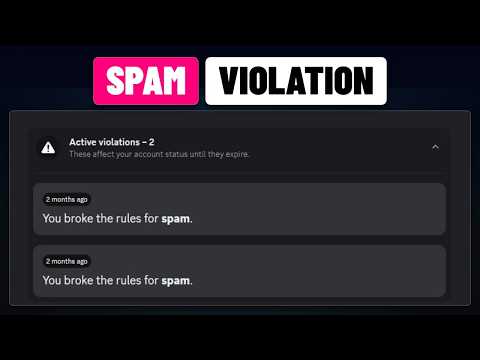
- A violation for spam: a system DM from Discord explaining a rule break and its effect on your account standing.
- Your account sends messages you did not write: a sign the account is compromised, not just flagged.
Discord's Safety Center explains why these layers exist. In its post on fighting spam, Discord defines spam as the automatic or centrally operationalized creation or usage of accounts en masse, and splits it into generated accounts, compromised accounts and human-operated accounts. Its systems are tuned to catch all three, which occasionally sweeps up a normal user who simply moved fast.
Limited Access: The Red Banner
Limited Access is the state most people mean by this search. Discord says that if it detects suspicious behavior on an account, it may place the account in Limited Access, and the banner reads: "Hey, something looks off with your account so we limited your access, but sometimes we make mistakes."
While limited, here is what changes:
- You can still message your existing friends.
- You cannot send outgoing friend requests.
- You cannot direct message any new friends added while you were limited.
- You cannot join new servers.
Discord says other users see no indication that your account is in Limited Access, so your friends will not see a warning on your profile. To get out, Discord offers three routes, all of which submit a review ticket: the Regain Access Here button at the top of the client, the Regain Access Here link in the notice that appears when you try to join a server, or the appeal form linked from the Limited Access FAQ. Submit one request, and if you have more to add later, put it in that same ticket thread; Discord's support team asks for updates to go into the existing ticket so whoever is handling it sees everything in one place.
Verification Required Prompts
A Verification Required message is Discord asking for proof that a real person is behind the account. Its Help Center says the check helps confirm you are less likely to be spam and adds a barrier against malicious activity on your account.

Discord lists the behaviors that commonly trigger it:
- Joining multiple servers in a short period of time.
- Direct messaging multiple users who are not your friends.
- Sending messages or posting to communities faster than a human can manage.
- Using third-party clients or modifications to Discord.
The fix is to press Start Verification and add a valid mobile number, then enter the SMS code. The number cannot already be attached to another Discord account, and VOIP, burner and landline numbers are rejected. If you see a "recently used" error, Discord says to wait 24 to 48 hours before trying that number again. Servers can ask for similar checks through their own verification levels; our guide to a Discord account too new to join a server explains the difference.
When Your Messages Are Blocked or Filtered
Sometimes the account is fine and a single message is the problem. In Community servers, Discord says a "Your message could not be delivered" error means the message tripped one of the server's filters:
- Keyword filters for words or phrases the community does not allow.
- Mention spam filter for too many unique mentions in one message.
- Spam content filter for content that has been reported as spam or resembles reported spam.
- Suspicious link filter, present in every Community server, which blocks links to malware or phishing sites.
Rewording the message, removing the link or cutting the mentions usually fixes it. If you think AutoMod blocked you unfairly, Discord suggests asking that community's moderators.
Direct messages have their own filter on the receiving end. Discord can route DMs that may contain spam into a separate spam inbox under Message Requests. Discord's own articles describe the default differently: the Safer Messaging article says the default filters messages from non-friends, while the Message Requests article says spam filtering is set to filter all incoming DMs by default. Either way, if a new contact never answers, your message may simply be sitting in their spam folder.
If Your Account Is Actually Sending Spam
If friends tell you that you sent them strange links, free Nitro offers or "test my game" downloads, assume the account is compromised. Discord's spam post notes that compromised accounts are used to send spam to unsuspecting users, which can spread the compromise further.
- Reset your password and turn on multi-factor authentication. Our Discord 2FA guide walks through setup and backup codes.
- Open User Settings, then Authorized Apps, and deauthorize anything you do not recognize.
- Run a malware scan; Discord suggests a Windows Defender scan on Windows.
- If you lost control of the account or see unauthorized charges, submit a ticket through Discord's hacked account form.
- Warn friends and servers, and report the spam messages so Discord can trace them. Reports with user IDs and message links are easiest to act on, as our guide to copying a Discord account ID explains.
Discord's hacked account article also cautions that filing a chargeback with your bank for Discord transactions can lead to suspension pending investigation, so request refunds through Discord's billing team instead.
Spam Violations and Your Account Standing
A formal violation is different from Limited Access. Rule 13 of Discord's Community Guidelines says "Do not send unsolicited bulk messages (or spam) to others," and rule 14 says not to use self-bots or user-bots. If Discord finds you broke a rule, its Warning System sends a system DM with a card describing the policy, the content involved and any action taken.
Each violation affects your standing, which runs from All good through Limited, Very Limited and At Risk to permanent suspension. Discord says most violations expire after 90 days and move to an Expired Violations section. Every violation notice includes a link to request a review if you believe Discord made a mistake. Our existing guide to Discord account standing explains each level in detail.
People who keep a second or third profile should know that a spam penalty is not necessarily contained to the profile that earned it. Discord tells multi-account users that its safety team can extend action to every account it can connect to the same person, with more serious violations more likely to spread. Our guide on switching Discord accounts explains how the official switcher fits into this.
How to Avoid Getting Flagged Again
Most false positives come from behavior that looks automated. A few habits keep you clear:
- Pace yourself. Join servers gradually instead of dozens in an afternoon, and avoid messaging long lists of strangers.
- Use the official apps. Discord names third-party clients and modifications as a verification trigger, and rule 14 bans self-bots outright.
- Do not repeat links. Posting the same link across many channels or DMs looks exactly like the spam the filters are built to catch.
- Verify your account. A verified email and phone number reduce friction across Discord and in servers.
- Protect your login. Discord says it will never ask for your password or account token; anyone who does is trying to take over the account.
If everything was fine yesterday and messages are failing for everyone today, it may not be your account at all. Our guide on whether Discord is down right now explains how to check.
If You Are Thinking About Starting Over
After a frustrating flag, some readers wonder whether a different account would be easier. The store's Discord hub lists accounts from marketplace sellers, with listings that change every day. Bear in mind that Discord's Terms of Service prohibit selling, transferring, lending or licensing an account or username unless Discord grants written approval beforehand, and an account's past standing stays with the account. In most cases, a review request and a verified phone number are the faster fix.
Frequently Asked Questions
How long does Discord Limited Access last?
Discord does not publish a fixed duration. Use the Regain Access Here button to request a review if you think it was a mistake.
Can other people see that my account is limited?
No. Discord says other users see no indication that your account is in Limited Access.
Why does Discord say my account was flagged for suspicious activity?
Common triggers include joining many servers quickly, messaging many non-friends, posting at inhuman speed and using third-party clients.
Can I still talk to my friends while limited?
Yes, existing friends. You cannot message friends added during Limited Access or send new friend requests.
My Discord account was hacked and is sending spam. What now?
Reset your password, enable 2FA, remove unknown Authorized Apps, scan for malware and contact Discord through its hacked account form.
Do spam violations expire?
Most violations expire after 90 days, though severe ones can stay active longer.